
Turn off hyphenation
PubKeep can split a long word at the end of a line and add a hyphen, like Publisher does. You can turn this off for one text box, or for every new text box.
Turn it off in one text box
Section titled “Turn it off in one text box”- Click in the text.
- Click the Text Box tab, then click Hyphenation….
- Clear Automatically hyphenate this story.
- Click OK.
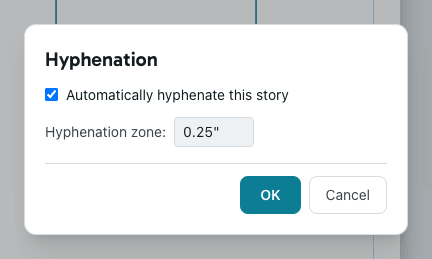
The setting covers the whole story, so linked text boxes change together. You can also right-click the text, point to Change Text, and click Hyphenation….
Turn it off for new text boxes
Section titled “Turn it off for new text boxes”- Click File, then Options.
- Click Advanced.
- Under Editing options, clear Automatically hyphenate in new text boxes.
- Click OK.
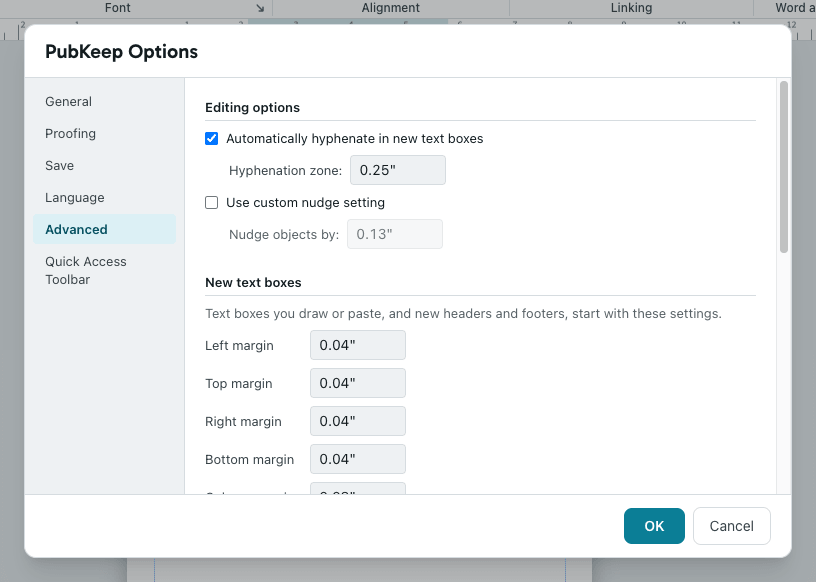
Text boxes you draw from now on start without hyphenation. Text boxes you already have keep their own setting.
If it still looks wrong
Section titled “If it still looks wrong”There are still hyphens in my text
Section titled “There are still hyphens in my text”Someone typed them. Delete them like any other character.