
How do I print on both sides of the paper?
You choose two-sided printing in PubKeep’s own print settings, under the sides card.
Print on both sides
Section titled “Print on both sides”- Click File > Print, or press Ctrl+P (Cmd+P on a Mac).
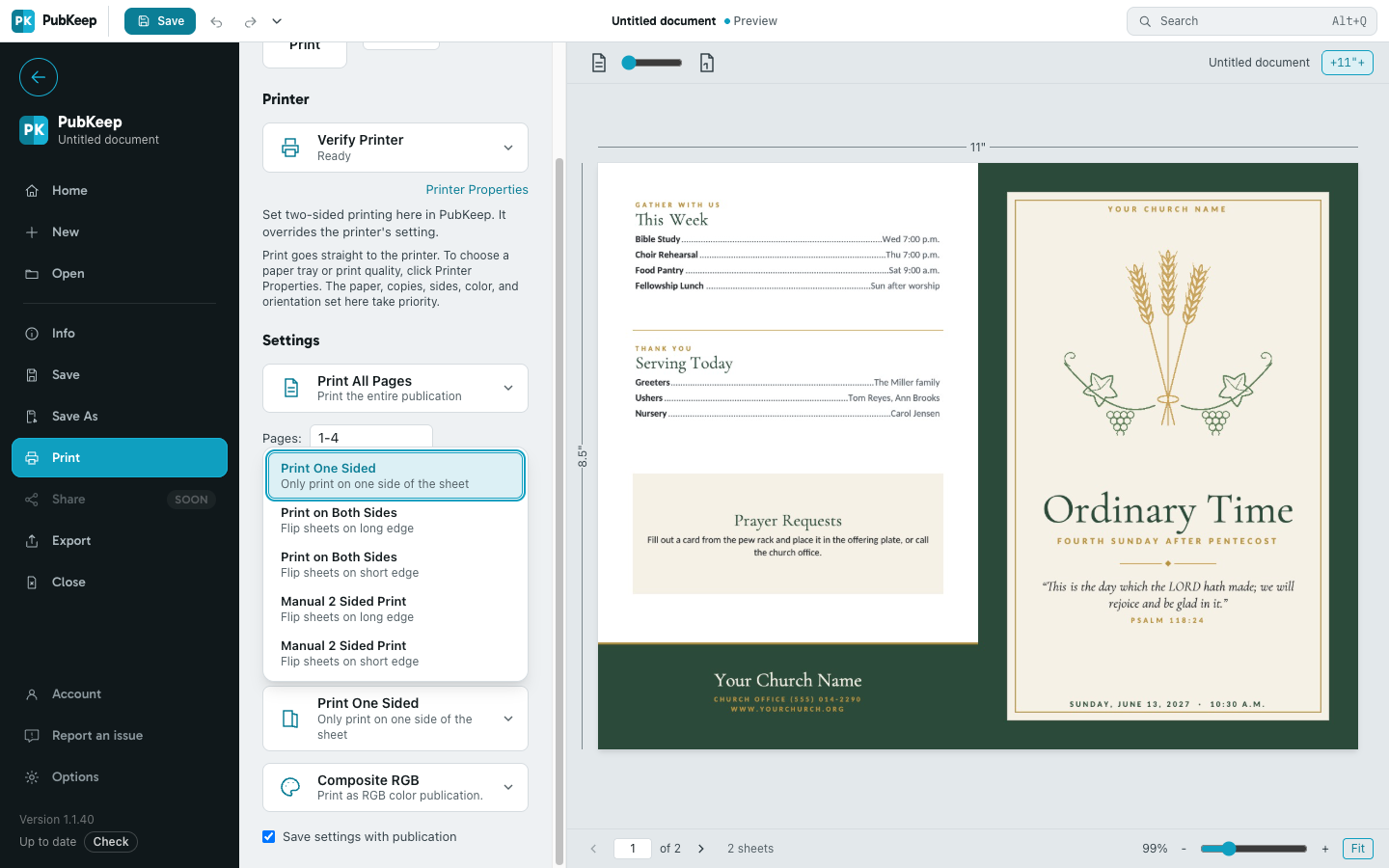
- Under Settings, click the sides card (it says Print One Sided or Print on Both Sides).
- Choose the Print on Both Sides that matches how you’ll turn the page:
- Flip sheets on long edge for regular portrait pages you turn like a book, like a letter or a flyer.
- Flip sheets on short edge for a booklet or bulletin you fold in half.
- Click Print.
When you print a booklet on a printer that prints both sides, PubKeep picks the right edge for you. If the backs come out upside down, switch to the other edge.
Your printer’s own setting
Section titled “Your printer’s own setting”In the Windows desktop app, the sides you pick in PubKeep override the printer’s own two-sided setting. The paper, copies, sides, color and orientation you choose in PubKeep win over what’s set in Printer Properties. Use Printer Properties for things PubKeep doesn’t set, like the paper tray or print quality.
Print both sides by hand
Section titled “Print both sides by hand”If your printer can’t print both sides, it lists only Print One Sided and Manual 2 Sided Print.
- On the sides card, choose Manual 2 Sided Print with the edge you want.
- Click Print. PubKeep prints the fronts first.
- When it says “Ready to print the second side”, take the printed stack and put it back in the same tray. PubKeep tells you which sheet goes in first.
- Click OK to print the backs.
If it still looks wrong
Section titled “If it still looks wrong”The printer didn’t accept a two-sided job
Section titled “The printer didn’t accept a two-sided job”Choose Manual 2 Sided Print instead, or export a PDF and print it two-sided from your PDF viewer. Some office copiers also need a user or account number set in Printer Properties.
Only one side prints
Section titled “Only one side prints”Make sure the sides card says Print on Both Sides, not Print One Sided. For a booklet, see How do I print a booklet or church bulletin?