How-to guide
How to open a .pub file without Microsoft Publisher.
A .pub file is a Microsoft Publisher document, and since Microsoft removed Publisher from Microsoft 365 on October 1, 2026, plenty of people need to open one without it. The good news is that your files didn't change. You can open them on Windows or a Mac and keep editing, or keep a fixed copy as a PDF.
Updated October 2026
Only need PDFs of an old archive? PubKeep Converter turns a whole folder of .pub files into exact PDFs.
Short answer: open it in the PubKeep desktop app on Windows or Mac, and keep editing. To archive or share a fixed copy, convert it to PDF, a whole folder at a time with PubKeep Converter. LibreOffice Draw and Scribus open many .pub files for free, with some re-flow to clean up.
Five ways
What are the best ways to open a .pub file without Publisher?
To open a .pub and keep working on it, use the PubKeep desktop app, which reads the format directly on Windows and Mac. To keep a fixed copy, convert it to PDF. LibreOffice Draw and Scribus are free but re-flow the layout, and an old copy of Publisher works as a stopgap. Here they are, ranked.
Open it in the PubKeep desktop app
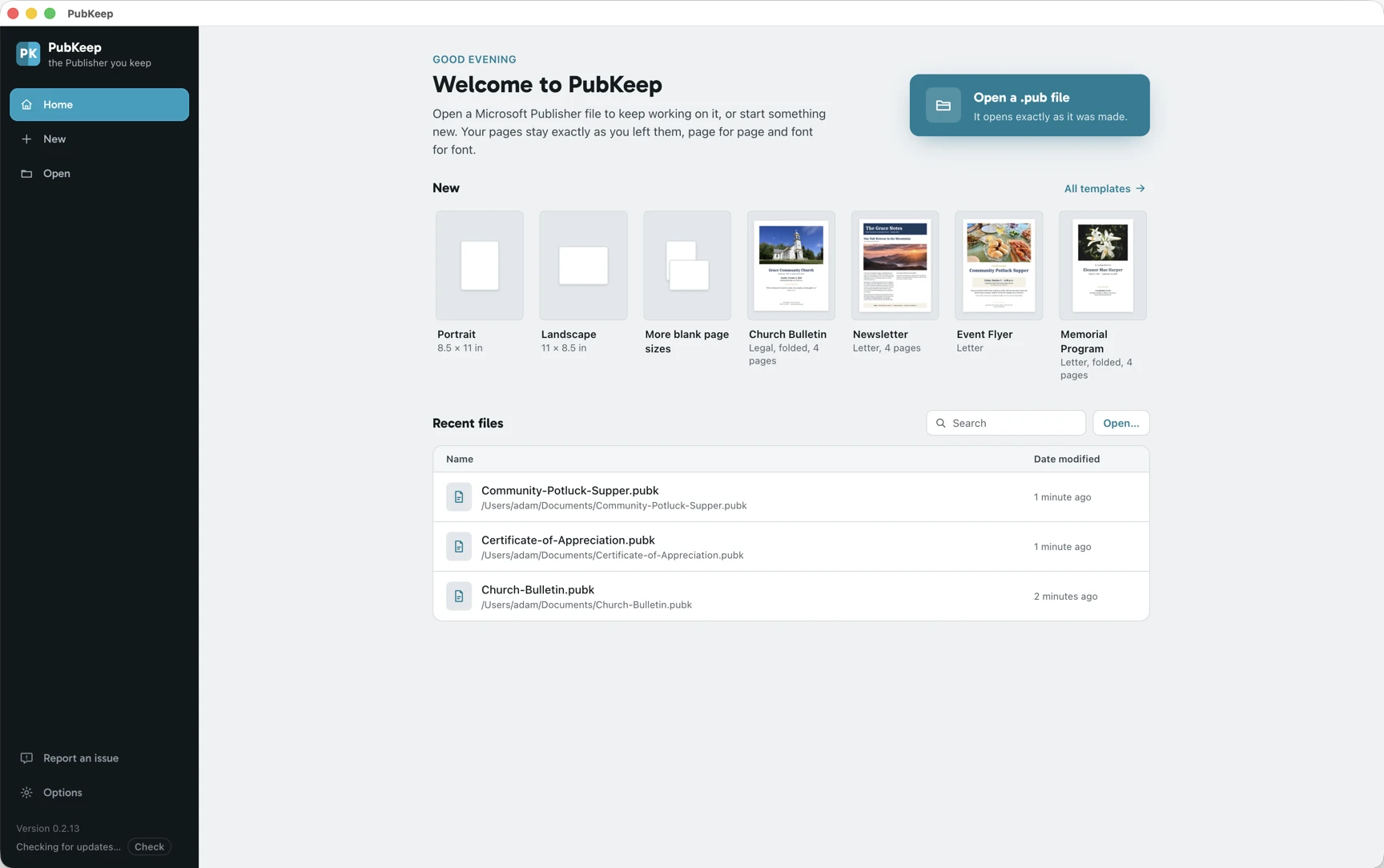
Best for opening and editingThe PubKeep desktop app opens the .pub format directly on Windows and Mac, with no copy of Publisher, and keeps the file editable. It reads the page the way Publisher laid it out rather than re-flowing it, so you can fix a date, swap a photo, and print again.
- On Windows, get PubKeep from the Microsoft Store. On a Mac, start your free trial at pubkeep.com and use the download link we email you.
- Start a free 7-day trial with just your email, no card, or paste your license key.
- On the start screen, click Open and choose your .pub file. There is nothing to import or convert first.
- Change what you need, then save as .pubk, print, or export a PDF.
- Opens files from Publisher 2000 through Microsoft 365, and upgrades Publisher 97 and 98 files first, with your OK. See the details on the features list.
- Saves your work as .pubk, an open format. It does not save back to .pub.
- A one-time $99 for one computer, no subscription. All prices are on the pricing page.
Want the full walkthrough? See how to edit a .pub file without Publisher, step by step.
Convert it to PDF
Best for archives and bulkA PDF holds every page exactly as Publisher drew it, so it opens on any phone, computer, or tablet with no special app. It is a finished page, not an editable layout, which makes it the right choice for an archive, or for files you only need to read or share. PubKeep Converter makes exact PDFs, page for page and font for font, and takes a whole folder at once.
- Nothing to install. Drop your files in the browser and download PDFs.
- Bulk by design: a folder of .pub files, subfolders and all, in one go.
- Exact output, with bleeds and rotated frames intact, nothing re-flowed.
- First 3 files free with just your email. Then one-time packs from $49 for 50 files up to $299 for 1,000, credits never expire.
Open it in LibreOffice Draw or Scribus
Free, editable, imperfectLibreOffice Draw and Scribus are both free, open-source apps that can open and edit many .pub files. They are real options if you want to keep editing and do not mind fixing things up. Both read the closed Publisher format from the outside, through the same open-source engine (libmspub), so fonts get substituted and spacing shifts, and complex bulletins and booklets often need cleanup.
- Free and available for Windows, macOS, and Linux.
- Good for simple, one-off files you are willing to touch up.
- Fidelity varies file to file, they re-flow the layout, and each opens one at a time.
Recent versions of Affinity Publisher can open .pub too, but users report it re-flows the layout badly and leaves many Publisher features unsupported, so the result is often unusable.
Use an old copy of Publisher, if you have one
StopgapIf a perpetual Publisher 2016, 2019, or 2021 is still installed somewhere, it opens .pub files perfectly, because it is the real thing. Treat it as a bridge, not a plan: Microsoft ends support on October 13, 2026, and the app is tied to that one aging Windows machine.
Convert to Word
Microsoft's suggestion, with caveatsMicrosoft points people toward Word. It can work for a plain, text-heavy document, but Publisher layouts do not map onto Word, so multi-column pages, precise placement, and fold-over booklets tend to fall apart. If your file is a designed page, open it in PubKeep or keep it as a PDF instead.
Still deciding?
Which method should I choose?
Choose by what you need. To keep working on the file, open it in the PubKeep desktop app. To read, share, or archive it, convert it to PDF, a whole folder at a time if you have one. If you would rather not pay, LibreOffice Draw or Scribus will open it with some cleanup.
You need to keep editing. Open the .pub in the PubKeep desktop app on Windows or Mac. It keeps the layout and the file stays editable, so next week's bulletin starts from last week's. You can try it free for 7 days on your own files.
You want to read, share, or archive the file. Convert it to PDF. It is the one format that keeps the page exactly and opens everywhere, and it is the format Microsoft itself recommends for keeping your work.
You have a whole folder of files. Do not open them one at a time. Convert the folder in bulk with PubKeep Converter so you keep the same structure and get a report of anything that needs a second look.
You are choosing what to use from now on. See Microsoft Publisher alternatives and replacements for the full rundown, for your old files and for new work.
Questions
Opening .pub files, answered.
A .pub file is a Microsoft Publisher document, the layout format Publisher (or MS Publisher, as it is often shortened) saves in. It holds a designed page, like a bulletin, flyer, or newsletter, rather than plain text, which is why apps like Word open it poorly. Publisher left Microsoft 365 on October 1, 2026, but your files still open in an app that reads the format, like the PubKeep desktop app.
Publisher never ran on a Mac, so a Mac has nothing built in for .pub files. The PubKeep desktop app runs on Macs with Apple silicon or Intel and opens .pub files directly, ready to edit. LibreOffice Draw also runs on a Mac and opens many .pub files for free, though the layout may shift. Or convert the file to PDF and open it in Preview.
Yes. LibreOffice Draw is free and will open most .pub files, though the layout may shift. PubKeep has a free 7-day trial, and after it ends you can still open and view your files. PubKeep Converter also turns your first 3 files into exact PDFs free, with just your email.
Yes. PubKeep opens and shows your .pub files on Windows and Mac, and once the free 7-day trial ends it still opens and views them. A license unlocks editing, saving, printing, and export. For a file you only need to read or share, a PDF works as a viewer too: convert it and it opens in any browser, on any phone or computer.
Converting to PDF keeps every page exactly as Publisher drew it, page for page and font for font. PubKeep keeps most files as Publisher laid them out, and tells you when a file uses something it doesn't draw yet. Tools that import the file for editing, like LibreOffice Draw or Word, usually re-flow the text and break the design.
Most tools open one file at a time. PubKeep Converter takes a whole folder at once, subfolders included, and returns a matching zip of PDFs plus a report of anything that failed.
Yes, in PubKeep. It keeps the file editable, so you can change text, swap pictures, and add pages, then save as .pubk, print, or export a PDF. It does not save back to .pub. A PDF is a finished page, so convert only the files you want to keep as they are. Here is how to edit a .pub file without Publisher, step by step.
No. The PubKeep desktop app reads and edits the .pub format on its own, and PubKeep Converter, LibreOffice Draw, and Scribus all work without Publisher too.
Keep reading
Related guides.
Edit a .pub file without Publisher
Step by step on Windows or Mac, plus the other ways to edit, compared.
Microsoft Publisher alternatives and replacements
What to use instead, for your old files and for new work.
Microsoft Publisher end of life
The dates, what changes, and the ways to keep your work.
Convert .pub to PDF
The bulk converter for archives, pricing, and how it works.
Keep editing
Open your .pub files as they are.
A one-time $99, no subscription. Only need PDFs? Convert your first 3 files free.