How-to guide
How to edit a .pub file without Microsoft Publisher.
Microsoft removed Publisher from Microsoft 365 on October 1, 2026, but your bulletins, newsletters, and flyers still need this week's date. You can keep editing them without Publisher, on Windows or a Mac. Here is how, step by step, and how the other options compare.
Updated October 2026

Short answer: open the .pub in the PubKeep desktop app on Windows or Mac, change what you need, then save, print, or export a PDF. It keeps your layout instead of re-flowing it. Free tools like LibreOffice Draw and Scribus can edit a .pub too, but expect to tidy up fonts and spacing.
Step by step
How do I edit a .pub file in PubKeep?
PubKeep is a desktop app that opens Publisher's .pub format directly, with no copy of Publisher on your computer. It takes about ten minutes from download to your first edit.
-
1.
Install PubKeep
On Windows, get PubKeep from the Microsoft Store. On a Mac, start your free trial at pubkeep.com and use the download link we email you. That link works for Windows too.
Want pictures of every screen? See how to install PubKeep.
-
2.
Start your free trial
Start a free 7-day trial with just your email, no card. If you already bought a license, paste your license key instead.
-
3.
Open your .pub file
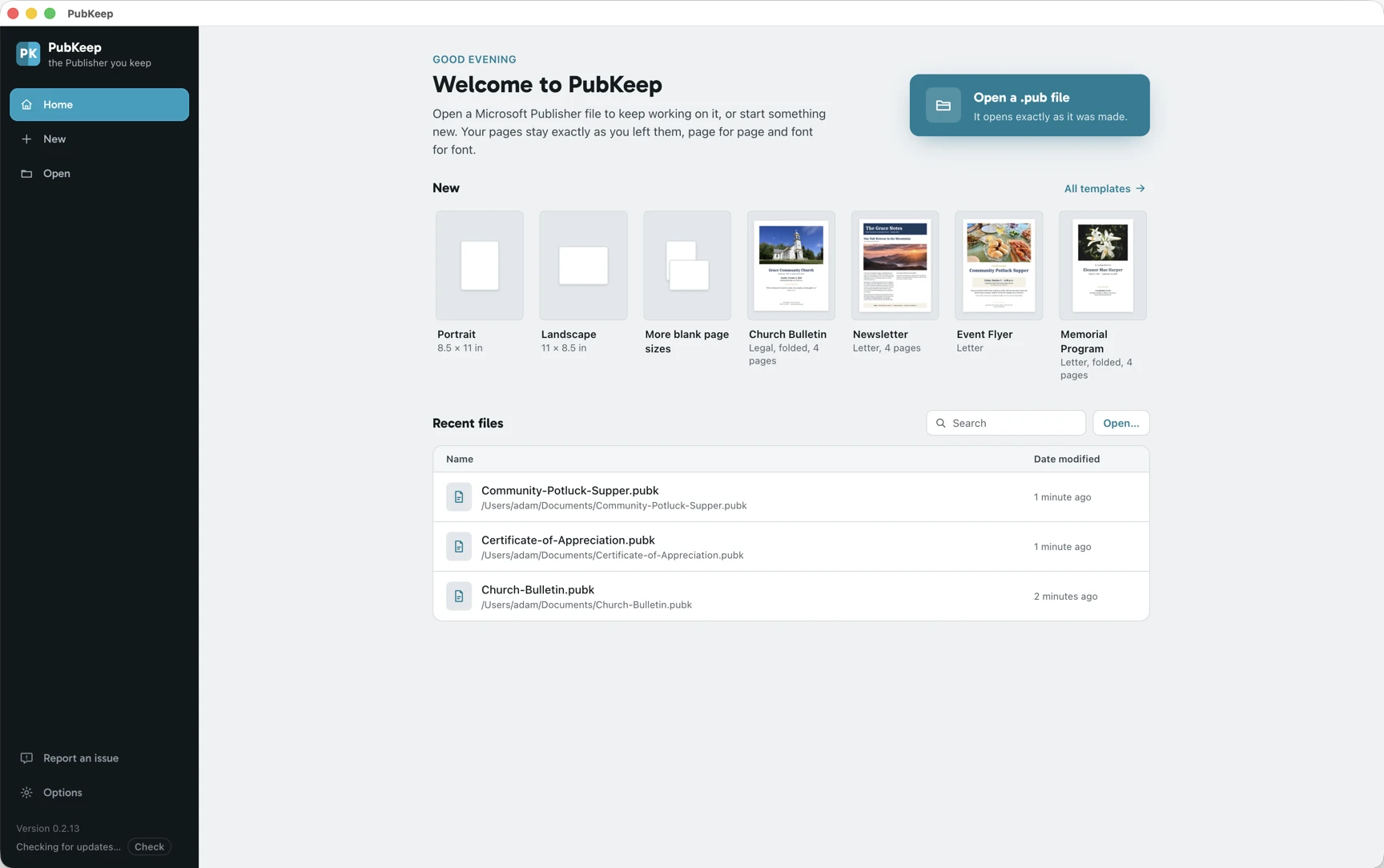
On the start screen, click Open and choose your .pub file. There is nothing to import or convert first. If the file uses a font you don't have, PubKeep tells you which one.
-
4.
Make your changes
Double-click any text box to change the words, use Change Picture to swap a photo, and move, resize, or add pages the way you did in Publisher. Master pages, columns, linked text boxes, and tables stay editable.
- Text keeps its fonts, sizes, bullets, drop caps, and text wrap.
- Mail merge from Excel or CSV, fold-over booklets, and common Avery label sheets work too.
- Undo goes back through your last 100 changes.
The features list shows everything PubKeep does today, and what is partial or still coming.
-
5.
Save your work
Choose File > Save. PubKeep saves your edited publication as a .pubk file and leaves your original .pub as it was.
-
6.
Print or export a PDF
Choose File > Print to print, fold-over booklets included, or File > Export to make a print-ready PDF or save a page as a picture.
A one-time $99 for one computer, no subscription. Licenses for 2, 5, and 10 computers are on the pricing page.
Made in PubKeep
What editing a .pub looks like.
The same pages you made in Publisher, open and editable. These are real screens from the PubKeep desktop app.


Other ways
What are the other ways to edit a .pub file?
There are a few, and they are not all the same kind of tool. Some import the file and rebuild the page, some turn it into a fixed copy you can read but not edit, and one is a version of Publisher that is running out of time.
| Way to edit | Keeps the layout? | On a Mac? | Price |
|---|---|---|---|
| PubKeep desktop app | Yes, for most files, with any gaps named when the file opens | Yes | $99 once, 7-day free trial |
| LibreOffice Draw or Scribus | No, re-flows text, fonts and spacing shift | Yes | Free |
| Affinity Publisher | No, users report it re-flows badly and drops many features | Yes | Free |
| Convert to PDF or Word | PDF yes, but it is a fixed page. Word usually breaks the design | Yes | Varies |
| An old copy of Publisher | Yes | No, Windows only | Only if you already own it |
LibreOffice Draw and Scribus are free, open-source apps that can open and edit many .pub files. Both read the format through the same open-source library (libmspub) and rebuild the page from it, so text re-flows, fonts get swapped, and spacing moves. They are a fair choice for a simple one-off file you don't mind touching up. Complex bulletins and booklets usually need real cleanup. The PubKeep vs LibreOffice Draw comparison goes into more detail.
Affinity Publisher is now free as part of the Affinity app from Canva, and recent versions import .pub files. Users report the layout re-flows badly and most Publisher features don't come across, so an imported file often needs rebuilding. It is a strong design app for new work, which is a different job.
Converting to PDF or Word is for reading and keeping, not editing. A PDF holds every page exactly, which makes it the right format for an archive, and PubKeep Converter turns a whole folder of .pub files into exact PDFs. But you can't really edit a PDF layout. Word opens the text, though Publisher layouts don't map onto Word, so columns, placement, and booklets tend to fall apart. More on that in converting .pub to Word.
An old copy of Publisher still edits .pub files perfectly, because it is the real thing. If Publisher 2021, 2019, or 2016 is installed on a computer you still use, it will keep working for now. Treat it as a stopgap. Microsoft ends support for those versions on October 13, 2026, and the app stays tied to that one aging Windows machine.
Questions
Editing .pub files, answered.
Yes. Publisher only ever ran on Windows, but the PubKeep desktop app runs on Macs with Apple silicon or Intel and opens .pub files directly. Start the free 7-day trial and we email you the download link. LibreOffice Draw and Scribus also run on a Mac, though they re-flow the layout.
Yes, with limits. LibreOffice Draw and Scribus are free and can edit many .pub files, but they re-flow the layout, so expect cleanup. PubKeep has a free 7-day trial with just your email, no card. After the trial you can still open and view your files, and a license unlocks editing, saving, printing, and export.
In PubKeep, for most files, yes. It reads the page the way Publisher laid it out instead of re-flowing it, so text, pictures, shapes, tables, and backgrounds stay where you put them. A few things don't draw yet, like border art, pattern and texture fills, some older WMF and EMF drawings, and a few rare shapes. If your file uses one, PubKeep tells you when it opens. Importers like LibreOffice Draw, Scribus, and Affinity re-flow the layout, so fonts and spacing shift.
No. PubKeep opens .pub files but saves your work as .pubk, an open format. The .pub format is closed and undocumented, so writing it safely is not something we can promise. Your original .pub stays as it was, and you can print, export a PDF, or save a page as a picture at any time.
PubKeep uses the fonts installed on your computer, including Office cloud fonts that Microsoft 365 already downloaded. If a file uses a font you don't have, PubKeep tells you which one and shows the font it is using instead, just like Publisher. A stand-in font can move line breaks, so install the original font, then quit PubKeep and open it again.
Files from Publisher 2002 through Publisher for Microsoft 365 open directly. Publisher 2000 files open and edit, though some shapes and text wraps come in simpler than Publisher drew them. For Publisher 97 and 98 files, PubKeep offers to upgrade the file on our secure server first, which needs the internet, and deletes it from the server as soon as it's done.
A one-time $99 for one computer, with no subscription. Licenses for 2, 5, and 10 computers are on the pricing page, and you can try it free for 7 days first.
Keep reading
Related guides.
Open a .pub file without Publisher
Every way to open one in 2026, on Windows or Mac, honestly compared.
Microsoft Publisher alternatives and replacements
What to use instead of Publisher, for your old files and for new work.
PubKeep features
A plain checklist of what the desktop app does today.
How to install PubKeep
Pictures of every screen, on Windows and Mac.
Keep editing
Open your .pub and pick up where you left off.
A one-time $99, no subscription. No card for the 7-day trial.