Goodbye Publisher. Hello PubKeep.
Keep editing your .pub files, no Publisher needed.
PubKeep opens your .pub files on Windows and Mac and keeps them editable, page for page. Nothing to convert first. Pay once, no subscription.
Check your email.
We're sending your license key and download links from hello@updates.pubkeep.com. If it's not in your inbox in a few minutes, check spam or the Promotions tab, and add us to your contacts so updates land where you'll see them.
Look for our email from hello@updates.pubkeep.com. If it's not in your inbox, check spam or the Promotions tab, or write to hello@pubkeep.com and we'll resend it.
You're in good company.
0+ organizations have signed up for PubKeep
0+
churches
0+
nonprofits
0+
businesses
0+
joined in the last 24 hours
“I was greatly distressed at the prospect of losing the thousands of Microsoft Publisher files I’ve created over the past 30 years. PubKeep is a better solution than I even dared hope for.”
“I got more done just playing around with one document in 45 minutes than I had in other programs over the last week.”
“I tried Affinity and Scribus, and both were going to require some relearning. I was pleasantly surprised to see PubKeep was more like Publisher than the others.”
Made in PubKeep
You can stop worrying
Publisher is gone. Your work is not.
Microsoft removed Publisher from Microsoft 365 on October 1, 2026. That is the app going away, not your files. PubKeep keeps them open and editable, and it's available now.
Your files still open
PubKeep reads your .pub files directly. You do not need Publisher on the machine.
Your layouts still edit
Text boxes, columns, and pages stay live. Move a photo or fix a date, then export again.
Your tools still feel familiar
Master pages, guides, and booklets work the way you expect. The shapes you learned still apply.
You do not have to rebuild twenty years of layouts in Word. You do not have to learn Canva.
A first look
Open a .pub file. Pick up where you left off.
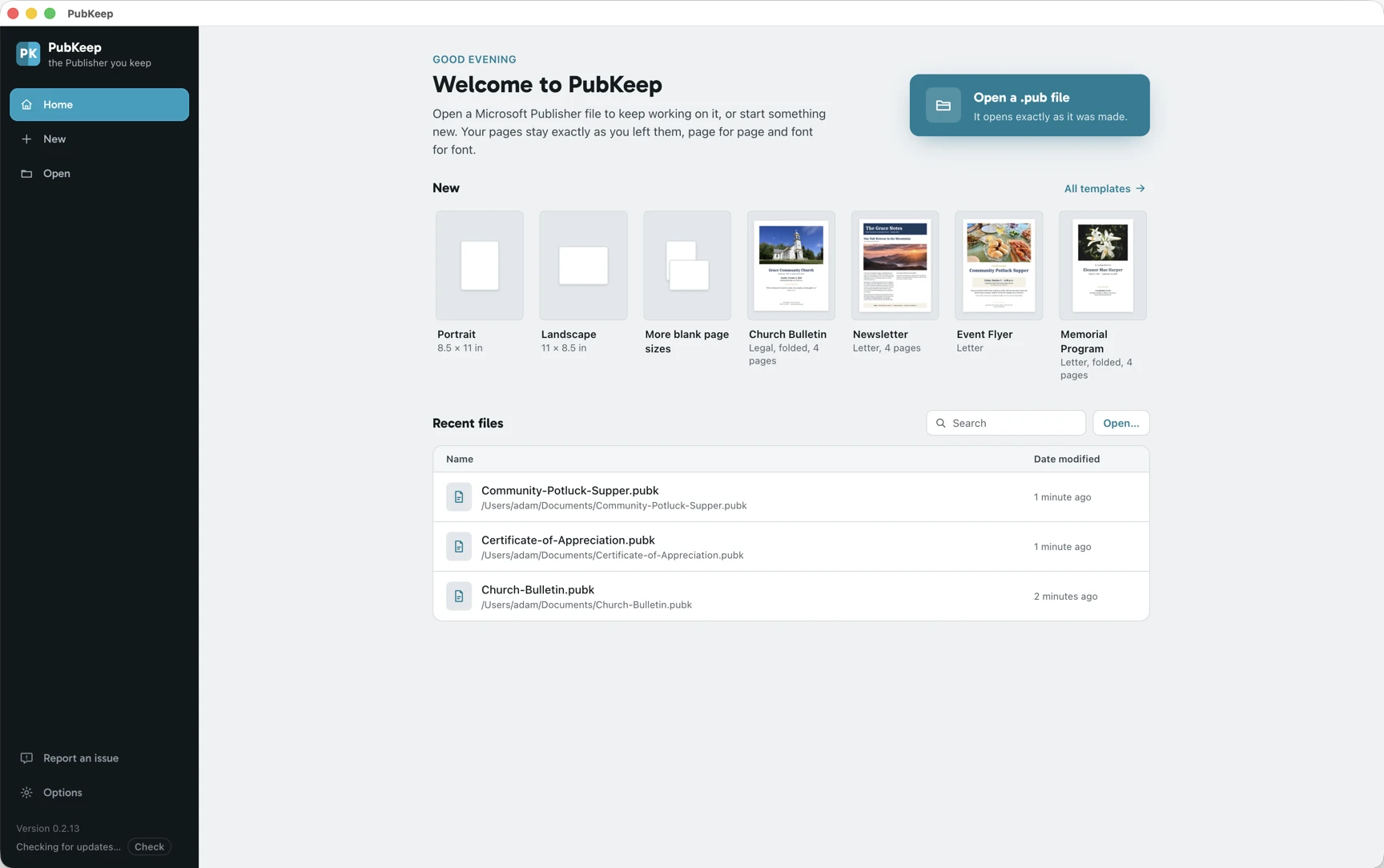
PubKeep opens to your recent work, so a Publisher file is one click away. Open a .pub directly, start from a template, or begin a blank page. No import step, and nothing to convert first.
A look at the PubKeep editor. PubKeep is available now, and you can try it free for 7 days.
What PubKeep does
Everything you created in Publisher, carried forward.
One app for your Publisher files. It opens them, keeps them editable, and exports print-ready PDF, right on the computer you already have.
Opens .pub without Publisher installed
PubKeep reads the Publisher format on its own, right on your machine. You do not need a copy of Publisher, or even Windows.
High fidelity, page for page
PubKeep aims to open your file the way you built it, page for page, not reflowed the way the free importers do. Text stays text, and every box stays movable.
Windows and macOS
Publisher only ran on Windows for 35 years. PubKeep runs on both, so you pick the computer.
Safe to install
PubKeep is code-signed by Saint Systems, a long-time Microsoft partner, so Windows and macOS know it's genuine.
The layout tools you used
Master pages, fold-over booklets, guides, and mail merge from Excel or CSV lists.
Buy it once
One payment, and the app is yours. No subscription, and no bill that shows up every month.
Everything you use in Publisher
See every feature →- Opens .pub files from Publisher 2002 through Microsoft 365
- Master pages, headers, and page numbers
- Fold-over booklets that print in the right order
- Mail merge from Excel or CSV lists
- Avery label sheets, name badges, and postcards
- Linked text boxes and columns
- Print on both sides, or export a PDF
- Starter templates for bulletins, newsletters, and calendars
For organizations and teams
Your office has years of Publisher files. Keep every one of them working.
Publisher leaves Microsoft 365 on October 1, 2026. For a church office, school, or nonprofit that is not one file. It is years of bulletins, newsletters, flyers, and signage, often made by several people on several computers. PubKeep opens those .pub files natively, so your team keeps editing the templates you already rely on instead of rebuilding them somewhere new.
Church offices
Weekly bulletins, event flyers, and directories, edited from last week's file.
Schools and classrooms
Newsletters, certificates, labels, and signage, the same templates every year.
Nonprofits
Donor letters, event programs, and brochures, on a budget that does not fit another subscription.
Small businesses
Menus, price lists, forms, and marketing pieces your team keeps up to date.
Buying for 5 or more computers? See volume licenses.
Churches, classrooms, and nonprofits can sign up as an organization and try PubKeep free for 7 days. Sign up as an organization →
Pricing
Buy it once. Try it free for 7 days.
PubKeep is available now for a one-time introductory Founder price of $99, or $159 for two computers, not a subscription. Want to try it first? Use it free for 7 days on your own files, no card needed. Microsoft removed Publisher from a subscription people were still paying for. PubKeep works the other way.
No subscription, ever.
Founder license
Pay once. No subscription.
- Available now on Windows and Mac
- One-time introductory Founder price, no subscription
- 1 year of updates, then keep the version you have
- Try it free for 7 days, no card needed
- Volume licensing available for teams
1 computer $99
Buy for 1 computer, $99Introductory pricing through October 31.
Secure checkout by Lemon Squeezy, a Stripe company. Already testing PubKeep? Use the email you signed up with so your license attaches to your account.
Pay once and keep it. There is no subscription.
From early users
“I have used Publisher for 28 years, and this is the best news I’ve had in a long time.”
“I am just so excited that we have an answer for Publisher. I am just a church secretary and don’t want to have to learn programs that I will never fully use. Thank you so much!”
“PubKeep saved my projects for work. Trying to learn InDesign is like learning a whole new language. Just not gonna happen!”
“You are saving the sanity of an untold number of people.”
Free 7-day trial
Try PubKeep free for 7 days.
Want to see it open your own files before you buy? Tell us where to email you and we'll send a license key and download links right away. Use it free for 7 days, no card needed.
What happens next
- We email your license key and download link right away.
- Install PubKeep on your Windows PC or Mac.
- Open any .pub file and keep editing. Nothing to convert.
Check your email.
We're sending your license key and download links from hello@updates.pubkeep.com. If it's not in your inbox in a few minutes, check spam or the Promotions tab, and add us to your contacts so updates land where you'll see them.
Look for our email from hello@updates.pubkeep.com. If it's not in your inbox, check spam or the Promotions tab, or write to hello@pubkeep.com and we'll resend it.
Questions
Common questions
No. Your .pub files keep working after October 1. You don't need to open, re-save, or convert them before the deadline. PubKeep opens them whenever you need them, next week or years from now.
Yes. You can buy the Founder license today, or try it free for 7 days on your own files first. We keep widening what it opens, and the public fidelity test we publish shows where it stands.
Yes. Try it free for 7 days on your own files first. There is no charge and no card needed.
Yes. That is what PubKeep does: open your Publisher files and keep them editable. It is available now. Publisher changed over 35 years, so some very old files may need extra work, and coverage widens from there.
Yes. PubKeep runs on Windows and Mac. Publisher only ran on Windows, so this is the first time your .pub files open natively on a Mac.
LibreOffice Draw and Scribus can import a .pub, but they reflow it. Fonts shift, spacing moves, and you clean up one file at a time. PubKeep aims for high fidelity, page for page, and keeps your file editable without the reflow. It is available now, and you can try it free for 7 days.
No. PubKeep opens your Publisher files and covers the layout work you did in Publisher. It is not a copy of Microsoft's app, and it does not use Microsoft's menus or icons. It is built to feel familiar in shape.
No. PubKeep opens .pub files directly, so you do not have to convert them first. If you only need PDFs today, the PubKeep Converter can do that now. The desktop app is for people who want to keep editing.
No, it's not a subscription. It's a one-time introductory Founder price of $99, or $159 for two computers. You buy it once and the version you buy runs forever, no monthly bill. Your purchase includes 1 year of updates; after that you keep the last version you got, and you can renew if you want to keep getting updates.
No. PubKeep saves to .pubk, an open format that anyone can read. The .pub format is closed and undocumented, so writing it safely is not something we can promise. You can still export a print-ready PDF any time.
PubKeep is a product of Saint Systems, a long-time Microsoft partner. We have built on Microsoft's platform for years. You can reach us at hello@pubkeep.com.
Keep your work
Keep publishing.
Your Publisher files have a future. Get PubKeep today for a one-time price from $99, or try it free for 7 days.